How to Check RAM Clearance with CPU Coolers? (Guide 2026)
To check RAM clearance with CPU coolers, compare your RAM module height with the cooler’s listed memory clearance. Also, confirm whether the heatsink or front fan overlaps the RAM slots. If needed, raise the fan and recheck the case height limit.
Introduction:
RAM clearance is an important check when choosing a CPU cooler, especially if you are using a large air cooler or tall RGB RAM. Even when a cooler supports your CPU socket, its heatsink or front fan may still overlap the memory slots. If the RAM is too tall, you may need to raise the fan or choose different parts.
This guide explains the exact measurements you need to check, including RAM height, cooler clearance, fan lift, and case CPU cooler height limit.
What Is Ram Clearance And Why Does It Matter?
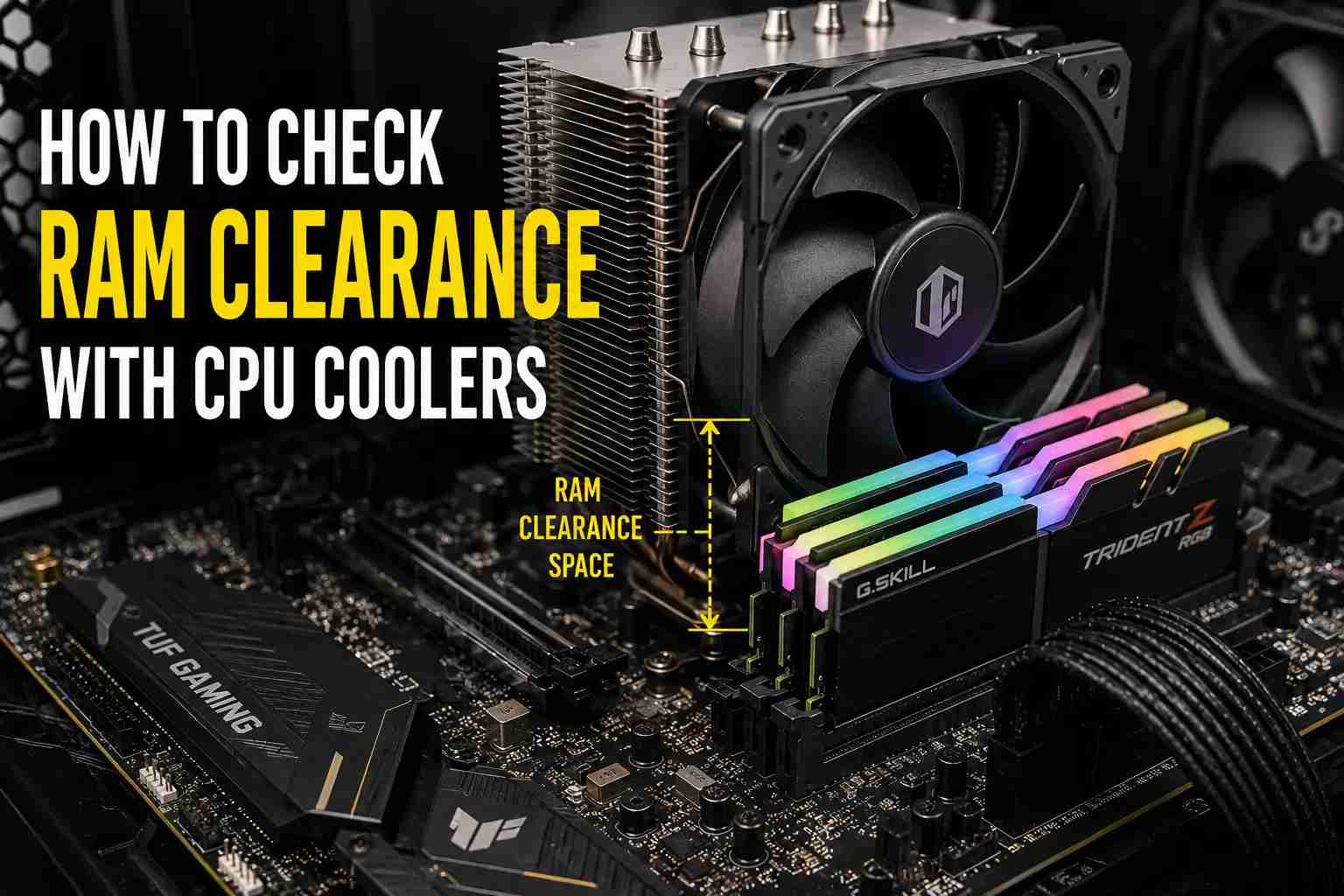
RAM clearance is the amount of space available between a CPU cooler and the RAM modules installed on the motherboard. It determines whether the memory can fit without hitting the cooler’s heatsink, fan, or heat pipes.
RAM clearance matters because many air coolers extend over the RAM slots. If the RAM is taller than the available clearance, the cooler may block a memory slot or require the front fan to be raised. In some cases, raising the fan can also increase the cooler’s total height and affect case compatibility. Checking RAM clearance before installation helps ensure that the RAM, CPU cooler, and PC case fit together properly.
Measurements Needed to Check RAM Clearance:
Checking RAM height alone is not enough to confirm clearance. You need to compare a few key measurements from the RAM, CPU cooler, PC case, and motherboard layout.
| Measurement | Why It Matters |
| RAM height | Shows how tall the memory module is. |
| CPU cooler RAM clearance | Shows how much space the cooler provides for RAM. |
| CPU cooler total height | Matters if the front fan needs to be raised. |
| Case CPU cooler height limit | Confirms whether the cooler can fit inside the case. |
| Motherboard layout | Helps identify whether the cooler overhangs the RAM slots. |
After noting these measurements, you can compare the RAM height with the cooler clearance and then check whether the full cooler setup will fit inside the case.
Finding Your RAM Height and CPU Cooler Clearance:
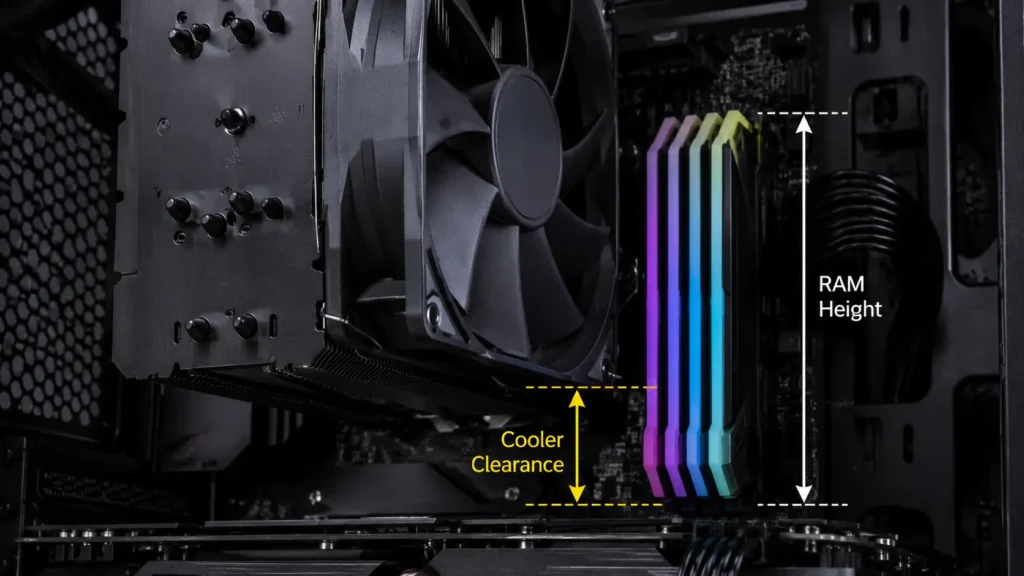
RAM height and CPU cooler clearance should always be checked from official specifications, not product photos or rough guesses. Small differences in RAM heat spreaders, RGB bars, fan position, or cooler design can change the final fit.
1. How to Find RAM Height
Start with the exact RAM model number and search for the manufacturer’s product page or datasheet. Look for terms like module height, dimensions, or height with heat spreader. Make sure the listed height includes the full module, including the PCB, heat spreader, and any RGB section.
2. How to Find CPU Cooler Clearance
Check the CPU cooler’s official product page, manual, or technical drawing. Look for terms like RAM clearance, memory clearance, or DIMM clearance. If the cooler uses a front fan, confirm whether the listed clearance applies to the heatsink, the fan, or both. If clearance is not listed, use the technical drawing or contact the manufacturer.
How to Check RAM Clearance With a CPU Cooler Step by Step:
Checking RAM clearance is straightforward when you compare the right measurements in the correct order.
1. Note the RAM height and cooler clearance
Find both values from the manufacturer’s specifications.
2. Compare the measurements
If the RAM height is lower than the listed clearance, the RAM should fit without modification.
3. Check whether the cooler overhangs the RAM slots
Look at the cooler’s technical drawing or product images to see if the heatsink or front fan sits above the memory slots.
4. Identify the source of interference
If the RAM touches only the front fan, the fan may be raised. If it touches the fixed heatsink, a different cooler or lower-profile RAM may be required.
5. Calculate the required fan lift
Measure how much additional clearance is needed for the RAM to fit below the fan.
6. Verify case compatibility
After raising the fan, make sure the cooler’s new height does not exceed the case’s CPU cooler height limit.
7. Make the final decision
The setup is compatible when the RAM clears the cooler, and the cooler still fits inside the case.
Does the CPU Cooler Overhang the RAM Slots?
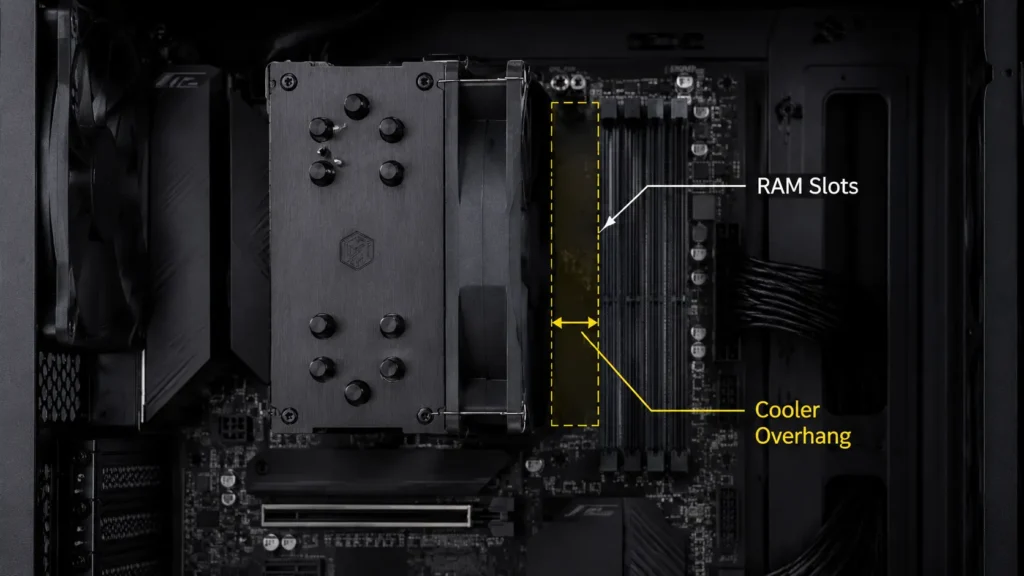
Not every CPU cooler extends over the RAM slots. Some coolers leave the memory area completely open, while others place the heatsink or front fan directly above one or more DIMM slots.
To check for overhang, review the cooler’s technical drawing, product images, or installation photos. If any part of the cooler sits above the RAM slots, compare your RAM height with the available clearance. Also, check whether the obstruction comes from the removable front fan or the fixed heatsink. A fan-related issue can often be solved by raising the fan, while heatsink interference usually requires lower-profile RAM or a different cooler.
CPU Cooler Heatsink Clearance vs Fan Clearance:
CPU cooler heatsink clearance and fan clearance are different measurements. Understanding the difference helps you identify whether a RAM compatibility issue can be fixed or if a different component is required.
| Heatsink Clearance | Fan Clearance |
| Space available beneath the cooler’s metal fin stack or heat pipes | Space available beneath the front fan |
| Usually fixed and cannot be increased easily | Can often be increased by raising the fan |
| Limited by the cooler’s physical design | Depends on the fan’s mounting position |
| If RAM touches the heatsink, a different cooler or lower-profile RAM may be needed | If RAM touches the fan, adjusting the fan position may solve the issue |
If the RAM only interferes with the front fan, the problem can often be resolved by raising the fan. However, if the RAM contacts the fixed heatsink, you may need lower-profile RAM or a different CPU cooler.
RAM Clearance and Required Fan-Lift Calculation:
If your RAM is taller than the available fan clearance, you can calculate how much the front fan needs to be raised to create enough space.
Required Fan Lift = RAM Height − Available Fan Clearance
For example, if your RAM is 44 mm tall and the cooler provides 36 mm of fan clearance, the required fan lift is 8 mm. Raising the fan by approximately 8 mm should provide enough clearance for the RAM to fit.
After calculating the required fan lift, the next step is to check whether raising the fan affects the cooler’s overall height and case compatibility.
The Effect of Fan Lift on CPU Cooler and Case Clearance:
Raising the CPU cooler fan can create enough space for taller RAM, but it may also increase the cooler’s overall installed height. In many air coolers, the fan becomes the highest part of the assembly once it is raised.
Because of this, RAM compatibility alone does not guarantee that the build will fit properly. After raising the fan, compare the cooler’s newly installed height with your case’s maximum CPU cooler height limit. If the adjusted height exceeds the available space, the side panel may not close even though the RAM clears the cooler.
For example, if a cooler is 157 mm tall and the fan must be raised by 7 mm, the new installed height becomes 164 mm. This height should remain within the case’s supported CPU cooler limit to avoid clearance issues.
Checking Compatibility With Technical Drawings and Online Tools:
Technical drawings and online tools can help you check compatibility before buying, but they should not replace manual measurement. Product photos can be misleading, so always confirm RAM clearance, DIMM clearance, heatsink overhang, fan position, and total cooler height from the cooler’s official manual or diagram.
1. Check the Official Cooler Drawing
Look at the cooler’s technical drawing to see whether the heatsink or front fan extends over the RAM slots. If only the front fan overlaps the RAM, it may be possible to raise the fan. If the fixed heatsink blocks the RAM, you will usually need lower-profile RAM or a different cooler.
2. Use Online Tools as a Starting Point
Tools like PCPartPicker can help flag basic compatibility issues between your CPU cooler, RAM, motherboard, and case. However, they may not fully verify physical clearance between tall RAM heat spreaders and large CPU coolers.
Important: Always compare RAM height, cooler clearance, required fan lift, and the case’s CPU cooler height limit manually before buying. The setup is safe only when the RAM clears the cooler, and the adjusted cooler height still fits inside the case.
Air Coolers vs AIO Coolers for RAM Clearance:
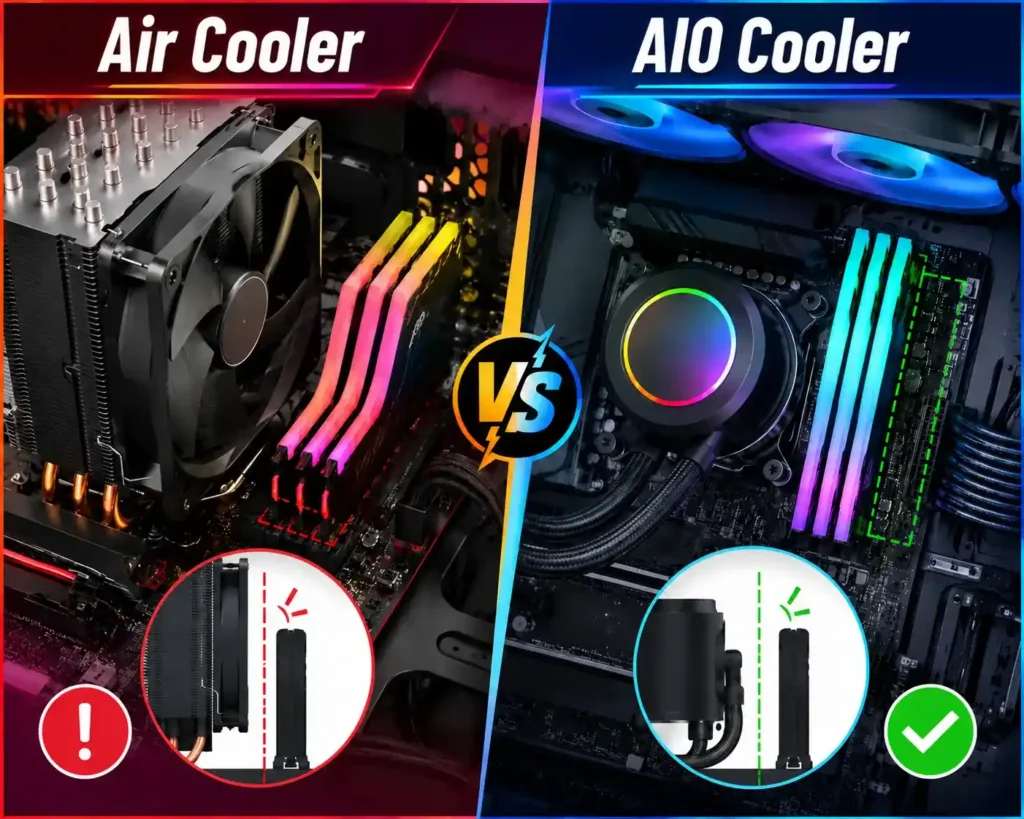
Air coolers and AIO coolers affect RAM clearance differently. Large air coolers can sometimes overhang the DIMM slots because of their heatsink or front fan. AIO coolers usually leave more open space around the RAM slots because the pump block is smaller than a large air heatsink.
| Cooler Type | RAM Clearance Impact | Best For |
| Air Cooler | May block tall RAM if the heatsink or front fan sits over the DIMM slots | Low-profile RAM or builds with confirmed cooler clearance |
| AIO Cooler | Usually gives better space around the RAM slots, but radiator placement still needs checking | Tall RGB RAM or builds where RAM access is a priority |
For RAM clearance, an AIO cooler is usually easier to work with, especially if you are using tall RGB memory. However, it is not completely clearance-free. If the radiator is mounted at the top of the case, also check radiator thickness, fan thickness, motherboard heatsinks, and RAM height before finalising the build.
Real RAM Clearance Calculation Examples:
Real examples make RAM clearance easier to understand. The main goal is to compare RAM height, cooler clearance, required fan lift, and the case’s CPU cooler height limit.
Example 1: RAM Fits Without Adjustment
RAM height: 34 mm
Cooler RAM clearance: 42 mm
The RAM is shorter than the available clearance, so it should fit without raising the fan.
Result: Compatible
Example 2: Fan Lift Is Needed
RAM height: 44 mm
Available fan clearance: 36 mm
Required fan lift = 44 mm − 36 mm = 8 mm.
If the cooler is 157 mm tall, the new height becomes 165 mm. If the case supports up to 170 mm, the cooler should still fit.
Result: Compatible
Example 3: Fan Lift Exceeds Case Limit
RAM height: 45 mm
Available fan clearance: 37 mm
Required fan lift = 45 mm − 37 mm = 8 mm.
If the cooler is 160 mm tall, the new height becomes 168 mm. If the case only supports up to 165 mm, the side panel may not close.
Result: Not Compatible
Solutions When RAM Does Not Fit Under the CPU Cooler:
If your RAM does not fit under the CPU cooler, first check whether the issue is caused by the front fan or the fixed heatsink. A fan-related issue is easier to fix, while heatsink interference usually requires changing the RAM or cooler.
- Raise the front fan
If the RAM only touches the front fan, move the fan slightly upward. After doing this, check that the cooler’s new height still fits inside the case. - Use low-profile RAM
Shorter RAM modules are often the simplest solution for large air coolers, especially when tall RGB memory causes clearance problems. - Choose a cooler with better RAM clearance.
If the heatsink itself blocks the RAM, look for a cooler with an offset design, higher DIMM clearance, or better motherboard compatibility. - Consider an AIO cooler
An AIO cooler can be a good option if you want more open space around the RAM slots because it does not use a large heatsink over the DIMM area.
Common RAM Clearance Mistakes to Avoid:
RAM clearance issues usually happen when builders check only one measurement and ignore the full build. Avoid these common mistakes:
- Checking only RAM height and ignoring CPU cooler clearance.
- Forgetting that the front fan may overhang the RAM slots.
- Raising the fan without checking the case height limit again.
- Relying only on product photos instead of official dimensions.
- Assuming every motherboard has the same RAM slot spacing.
- Buying tall RGB RAM without confirming cooler compatibility.
A quick manual check before buying can prevent most RAM and CPU cooler fitment problems.
CPU Cooler and RAM Compatibility Checklist:
Before buying or installing your parts, use this final checklist:
- RAM height is lower than the cooler’s listed RAM clearance.
- The cooler heatsink does not block the required RAM slots.
- The front fan position has been checked.
- Any required fan lift has been calculated.
- The adjusted cooler height fits within the case CPU cooler height limit.
- The motherboard DIMM slot layout has been reviewed.
- Official manuals, diagrams, or compatibility tools have been checked.
If all points are clear, your RAM and CPU cooler should be compatible.
Frequently Asked Questions:
1. How do I know if my RAM will fit under my CPU cooler?
Check your RAM height and compare it with the CPU cooler’s listed RAM or DIMM clearance. Also, check whether the heatsink or front fan overlaps the RAM slots.
2. What happens if my RAM is taller than the cooler clearance?
If the RAM only touches the front fan, you may be able to raise the fan. If the fixed heatsink blocks the RAM, you may need low-profile RAM or a different cooler.
3. Does raising the CPU cooler fan affect case clearance?
Yes. Raising the fan can increase the cooler’s total installed height. After raising the fan, compare the new height with your case’s CPU cooler height limit.
4. Are AIO coolers better for RAM clearance?
AIO coolers usually provide better RAM clearance around the CPU socket because the pump block is smaller than a large air heatsink. However, top-mounted radiators and fans can still create clearance issues with tall RAM, so case and radiator clearance should also be checked.
5. Is low-profile RAM better for large air coolers?
Yes. Low-profile RAM is usually safer with large air coolers because it has a shorter heat spreader and is less likely to touch the heatsink or front fan.
6. Can PCPartPicker confirm RAM clearance?
PCPartPicker can help with basic compatibility checks, but it may not catch every physical clearance issue between tall RAM and large CPU coolers. Always confirm RAM height, cooler clearance, fan position, and case height manually.
7. Should I install RAM before the CPU cooler?
In many builds, yes. Installing RAM first can make the process easier, especially when using a large air cooler that may block access to the DIMM slots.
Conclusion:
Checking RAM clearance with CPU coolers is not only about comparing RAM height with one clearance number. You also need to check the cooler overhang, front fan position, possible fan lift, motherboard layout, and the case’s CPU cooler height limit.
For the safest result, start with official specifications and technical drawings. If the RAM fits below the cooler and the adjusted cooler height stays within the case limit, the setup should be compatible. If not, consider raising the fan, using low-profile RAM, choosing a cooler with better clearance, or switching to an AIO cooler.